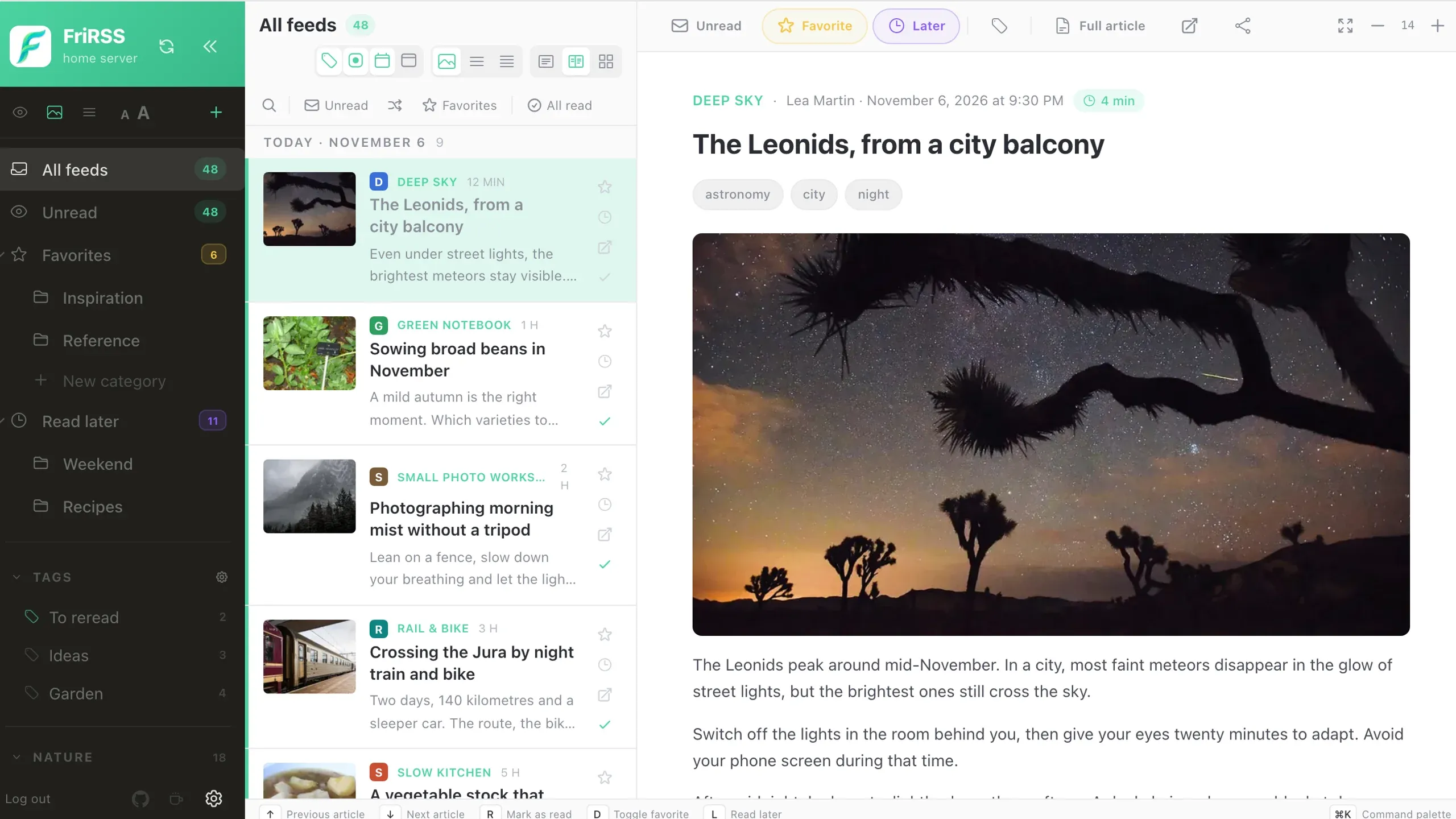







FriRSS on a computer in three columns: the feeds sidebar, the article list and an open article with its photo.
FriRSS on a computer, in three columns: the feeds, the article list and the open article.

Settle into your reading

Give every kind of feed the room it needs.

A layout for every feed

Three panes, two panes or a visual grid. Choose preview, standard or compact density, resize columns and adjust spacing.

The whole story

Retrieve full articles with Readability when a feed only includes a summary, images and videos included. Set the default globally or per feed. Extraction depends on the source website.

Keep the good ones

Favorites, read-later, categories and colored, nested labels keep your reading organized. Their counters show the total, the unread count or both; unread counts on labels need FreshRSS 1.26 or later. Search within the current view, including articles already read.

Stay on the keyboard

Open the command palette with ⌘K or Ctrl+K. Navigate feeds and actions with reassignable shortcuts and visible keyboard focus.

Video, when you press play

Supported YouTube embeds open from a thumbnail, on demand. Video requires an internet connection and loads from a third party.

Move at your own pace

Newest first, oldest first, or at random: rediscover articles in your current view. Choose how many articles to draw and how old they can be, then draw again whenever you like.

Take your reader everywhere

From a wide screen to a train with no signal.

A mobile PWA

Install the app from a supported browser. Swipe between articles, use touch actions and pull to refresh. PWA installation requires HTTPS outside localhost.

Read offline

Prepare the last 30 days of articles to read without a connection, images included. While it prepares, FriRSS estimates the time left, and you can cancel it. Pending actions and offline settings stay saved until you reconnect. Device storage limits still apply.

Pick up the thread

Resume your last feed and filters. On a shared device, each account and server keeps its own data; preferences sync across your devices.

Make it feel like you

Personalization goes beyond a light/dark switch.

Six starting points

Default, Riso, Paper and High Contrast in light; Night and Desk in dark. Follow your system appearance with your preferred pair.

Your own theme

Tune 38 colors and seven font sizes. Save, import, export and share themes. Set a custom app name and logo on your instance.

A grid sized your way

Set card width from 160 to 480 px, fill each row or keep a fixed width. Choose 16:9, 4:3, 3:4 or square images. On phones, the grid always fills the available width.

Toolbars your way

On computers, hide the buttons of the list bar and the reading pane one by one, or a whole bar. A hidden button stays in the command palette.

A list your way

Show or hide feed names, their icons and the date separators. Choose the action icons on each row: favorite, read later, open at source, mark as read.

Open on the right view

At launch, FriRSS goes back to the last view, or always opens All feeds or Unread. The server bar can be hidden too.

Ten languages

FriRSS speaks English, French, German, Spanish, Italian, Dutch, Polish, Portuguese, Ukrainian and Chinese. On first run it follows the browser’s language; change it in Preferences › General.

AI, on your terms

Optional, off by default, and configured by an administrator.

Summaries and translations

Get a summary above an article, adjust its length, or translate the title and body into one of 28 languages. Switch back to the original at any time.

Choose the provider

Use Anthropic or an OpenAI-compatible endpoint, including OpenAI, OpenRouter, Ollama and LM Studio. Choose models and per-feed or per-category behavior.

Know what leaves your server

Article text is sent to the selected provider. API keys are encrypted at rest and kept out of the browser. Admins control sharing and daily caps. Provider charges may apply.

Your servers. Your users.

One FriRSS installation can host multiple accounts and connect to multiple FreshRSS instances.

Accounts and single sign-on

Separate admin and user roles. Change your local password in preferences to sign out other sessions. Optional OIDC single sign-on links an existing account only after its owner confirms their password.

More than one FreshRSS

Switch FreshRSS instances from the top bar or command palette. Each server keeps its reading settings. Change its API password without removing it: FreshRSS checks the password before it is saved.

Docker, with room to grow

Official amd64 and arm64 images, persistent SQLite storage and encrypted backups. Redis is optional and strongly recommended for shared caching and prefetching.

Hosting advice

This page covers the essentials of FriRSS. Every feature is described in detail in the full reference on GitHub, written in French. Full reference

The demo is open.

Explore the demo, then install FriRSS to read your own feeds.

Like FriRSS?

A star on GitHub makes a difference.

Star FriRSS on GitHub